Can you reuse a DIALux calculation after changing the luminaire?
Learn when a luminaire substitution requires a new DIALux calculation, which project inputs can stay, and which lighting results must be checked again.
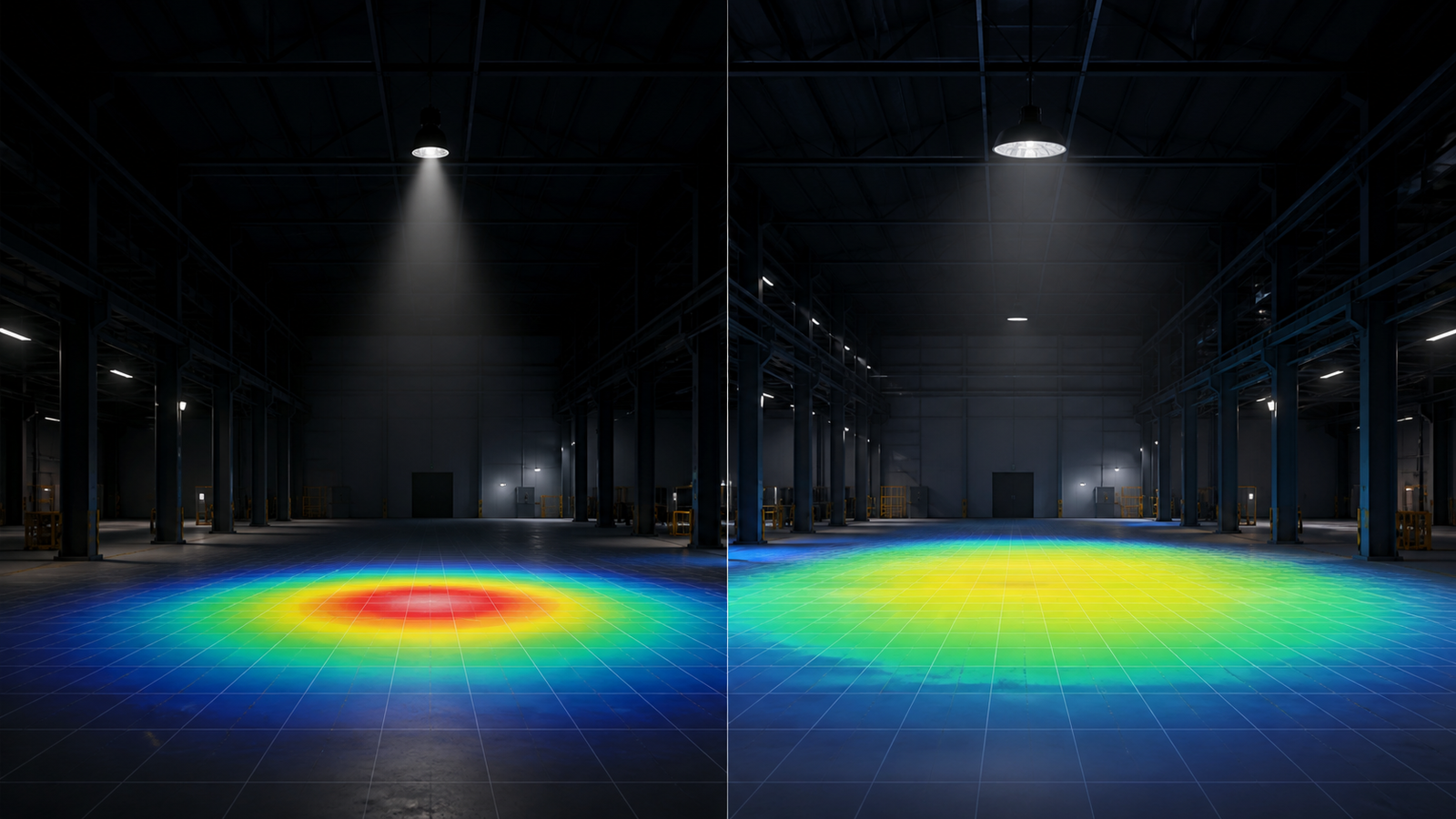
The short answer: reuse the project model, not the old result
A DIALux project can often be reused after a luminaire change, but the previous calculation result should not be treated as valid automatically. DIALux calculates with the selected product's photometric data, position, orientation and operating settings. A different luminaire can change where light reaches the calculation surfaces even when the room, pole, mounting point or fitting count stays the same.
The practical method is to preserve verified project geometry and calculation objects, replace the luminaires with the exact new variants, confirm their placement and settings, then calculate and review the project again. Whether the revised result is acceptable depends on the current client, consultant, authority and project criteria - not on the similarity of two catalogue descriptions.
1. Same wattage or lumen output does not mean the same photometry
Two luminaires can share a wattage, nominal lumen value or product housing while using different optics. Their luminous-intensity distributions may send light into different angles, changing average illuminance, minimum values, uniformity, glare, vertical illumination and spill outside the target area. A product family name is therefore not enough to prove equivalence.
Use the verified IES, LDT, ULD or GLDF data for the exact replacement article number, optic, output package and relevant configuration. DIALux's official luminaire resources emphasise planning with real luminaires and current product data, while its training material includes a dedicated luminaire-replacement workflow. If the manufacturer cannot identify the exact photometric variant, record that uncertainty before calculating.
2. Geometry may stay, but replacement settings still need checking
A well-built project model can retain room dimensions, road geometry, racks, machinery, calculation surfaces, reflectances and other assumptions that have not changed. That saves modelling time. It does not remove the need to verify each replacement point, because the new luminaire may have a different light-centre height, tilt reference, rotation, insertion point or physical obstruction.
DIALux's luminaire-replacement workflow can preserve existing mounting heights or apply new ones. Choose deliberately. For a floodlight or streetlight, confirm aiming, outreach and orientation; for a high-bay or panel light, confirm mounting height, row alignment and arrangement membership. Also check quantities and scene or dimming settings rather than assuming the replacement inherited every intended value.
3. Recalculate every result that informed the decision
Run the calculation again and review the same named task areas used for the original decision. Compare average and minimum illuminance, uniformity, value charts, false-colour views and any vertical surfaces, glare assessments or luminance criteria that genuinely apply. A replacement can improve one metric while weakening another, so one headline lux value is not a complete comparison.
Keep the comparison conditions controlled. Use the same geometry, calculation grid, maintenance assumptions, reflectances and evaluation criteria unless the revision intentionally changes them. If several inputs move at once, the report should separate those changes so the reader can understand whether the result came from the luminaire, layout, aiming, maintenance factor or another assumption.
4. Treat substitution as a documented project revision
Record the original and replacement manufacturer, product code, optic, photometric-file name and file date or revision where available. Note which luminaires were replaced, whether mounting or aiming changed and which calculation outputs were regenerated. This matters for distributors, contractors and consultants because a revised schedule can otherwise leave the report showing one product while procurement supplies another.
Do not use a visual render or a similar-looking beam image as proof that the substitution is equivalent. The final package should align the luminaire schedule, calculation documentation and supplied photometric files. A DIALux calculation can support technical evaluation or a submission, but approval still rests with the relevant client, consultant or authority and the complete project requirements.
Luminaire-substitution decision checklist
Before reusing the project, confirm: (1) the geometry and design criteria are still current; (2) the exact replacement article number and optic are known; (3) a verified photometric file is available; (4) mounting position, light-centre height, tilt and rotation are correct; (5) quantities, arrangements and controls remain intentional; and (6) every decision-relevant calculation surface and metric will be recalculated.
Before issuing the revision, compare the old and new results under controlled assumptions, inspect weak locations rather than only averages, update the luminaire schedule and report, and archive both photometric files with clear revision notes. If exact data is unavailable, state the limitation and do not present the old result as proof of the new product.
Frequently asked questions
Can I replace a DIALux luminaire with another fitting that has the same lumens?
You can replace it in the model, but you must recalculate and review the results. Equal nominal lumens do not guarantee the same light distribution, uniformity, glare or vertical performance.
Do I need to rebuild the whole DIALux project after a luminaire substitution?
Usually not. Verified geometry and calculation objects can often remain. Replace the exact luminaire data, check mounting and aiming, rerun the calculations and document the revision.